
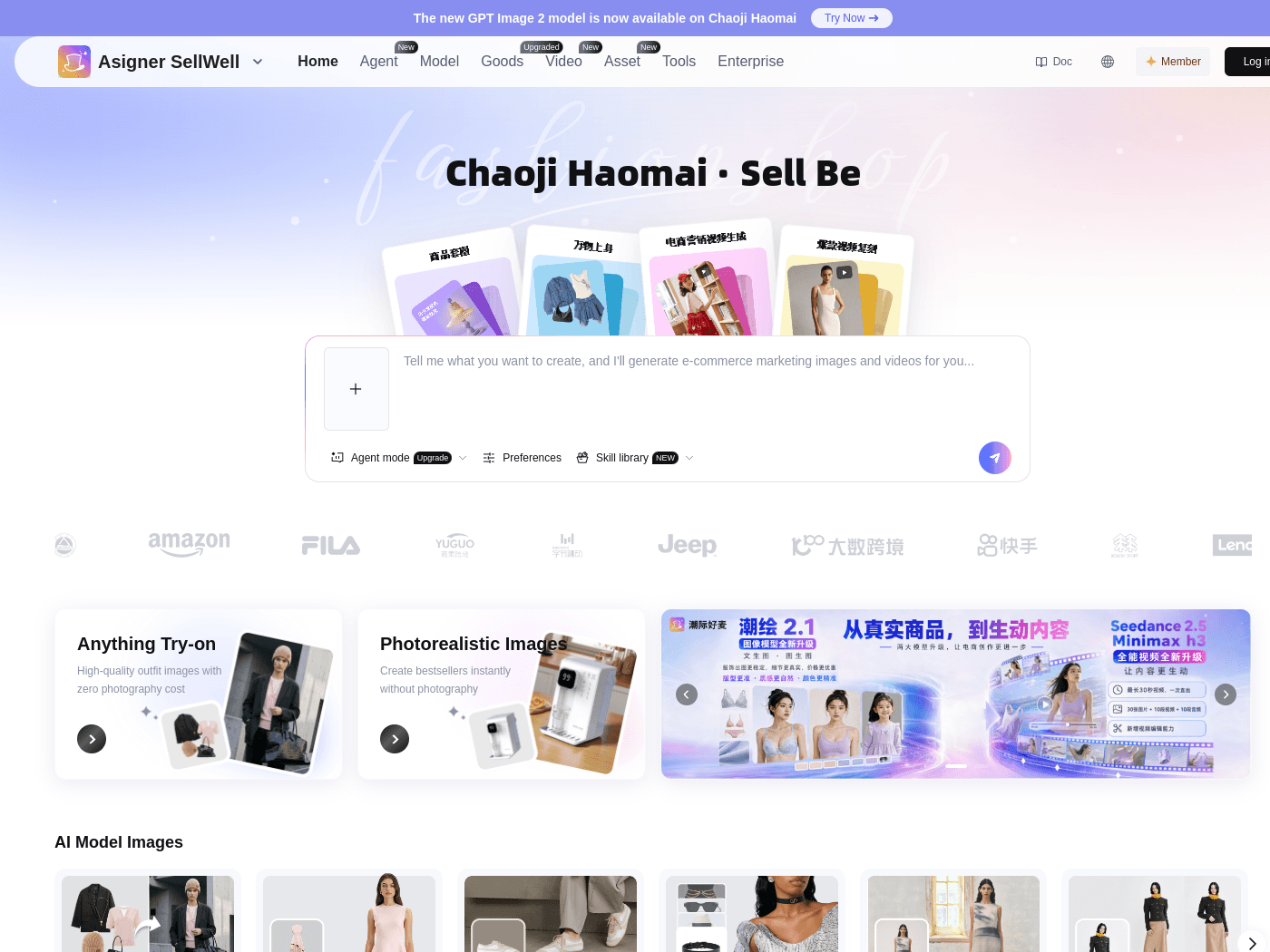
Overview
- Tool name: Chaoji Haomai
- Developer: 潮际汇(杭州)智能科技有限公司
- Official website: https://chaojihaomai.cgref.cn/s/50k9d68ng6
- Category: AI Image Tools
Chaoji Haomai is an AI image tool built for e-commerce product visuals. Brands can turn flat-lay and mannequin shots into on-model try-on images. Background swaps and shoe try-on are included as well.
Key Uses
- Apparel try-on from flat-lay or mannequin shots: upload a garment photographed flat or on a mannequin and get an image of it worn by a model, ready for listing pages and detail shots.
- Try-on from an existing person photo: swap a chosen style onto a photo of a real person to preview how the cut reads before booking another shoot.
- Footwear and accessory try-on: produce on-foot and worn images for shoes and accessories, categories where scale and fit are hard to judge from a packshot.
- Background replacement: restyle the setting behind a model image so one set of shots can feed seasonal pages, banners and marketplace listings.
- AI model images: generate model-led product visuals when there is no schedule or budget for a live model, a photographer and a studio.
- Model options: the platform lists Seedance 2.5 and GPT Image 2 among the models available alongside its own try-on workflows.
Who It Is For
- Apparel sellers with large catalogs who need on-model images for many SKUs and cannot shoot each one.
- Small and mid-sized stores without a studio, photographer or model budget for routine listing updates.
- Footwear and accessory brands that need worn shots to show fit and scale to shoppers.
- Marketing teams that need several versions of one product visual for ads, banners and seasonal campaigns.
Tips for Best Results
- Use clean, evenly lit source images with a plain background; busy or dim photos make it harder to keep the garment faithful.
- Compare every result with the original for silhouette, color, print placement and trims before it goes live.
- Approve one or two samples per style first, then batch the rest of the catalog to limit rework.
- Keep each source file paired with its output so you can regenerate when a colorway or campaign changes.
- Get permission before uploading photos of real people, and keep that permission on file.
Limitations
- Generated images can drift from the real item in color, drape and detail; close-up or high-accuracy categories need human review.
- Public pages reviewed for this profile do not state pricing, free credits or API access; confirm current terms on the official site.
- Complex prints, sheer fabrics, layering and unusual cuts may take several attempts to look right.
- Marketplace rules on edited product images differ by region and platform, so check them before publishing.
Frequently Asked Questions
How do I start using Chaoji Haomai?
Open the site and choose the workflow that matches your product: clothing try-on, shoe try-on, accessory try-on or background swap. Upload a source image and generate. Account and usage details are handled on the platform itself, so run one product through first to judge output quality.
Is Chaoji Haomai free, and does it offer free credits?
The public pages reviewed for this profile do not list prices, a free tier or trial credits. Whether the platform bills per image, by subscription or both has to be confirmed on the official site. Testing a small batch first is the practical way to see how many results are usable before scaling up.
How is it different from a general AI image generator?
A general text-to-image tool starts from a prompt and creates a new scene. Chaoji Haomai starts from a photo of an actual product and returns an on-model or restyled version of it. That makes it a catalog workflow rather than an open-ended illustration tool.
What input photos work best?
Flat-lay photos, mannequin shots and real-person photos are the input types the platform describes. Even lighting and a simple background make results more predictable. Getting the source framing and resolution right matters more than any prompt.
Are there alternatives worth comparing?
For general image generation, mainstream AI image tools cover the job. For on-model apparel visuals, compare virtual try-on products on input requirements, supported categories and output style. Published side-by-side data is scarce, so hands-on trials are the reliable way to choose.