
Guide: Generate videos with Veo MCP inside Cursor
10/03/2026 — 10/03, 09:11·1 sources·1 reports
Story overview
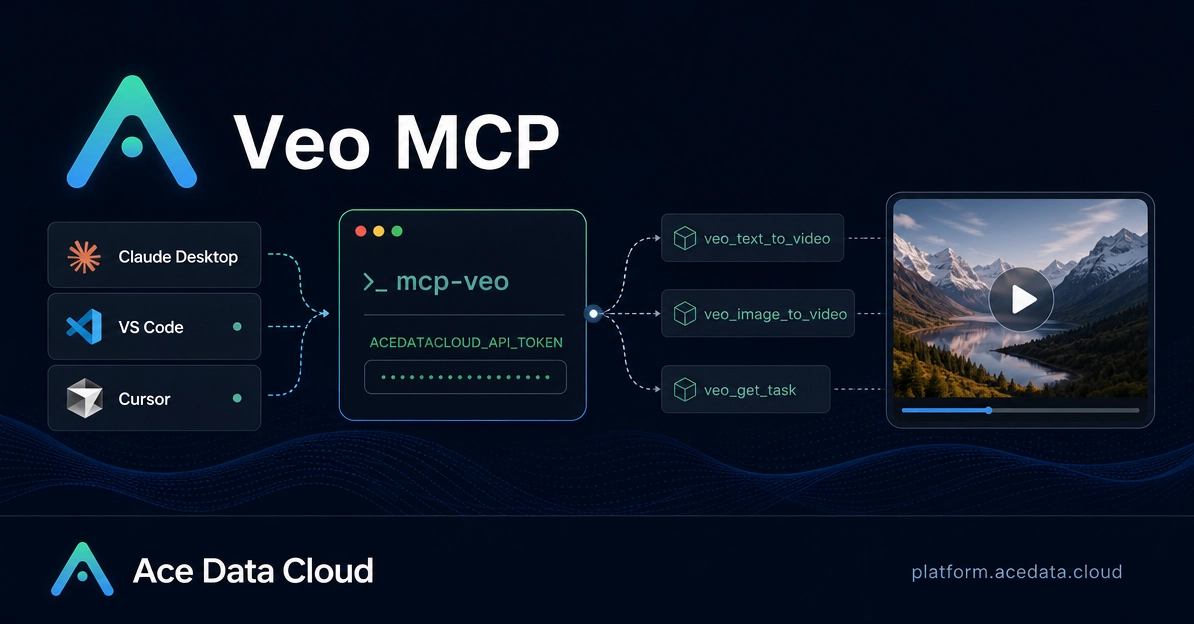
On October 3, 2026, DEV Community published a guide on generating video directly inside Cursor with Veo MCP. It walks through connecting the Veo MCP Server to Claude Desktop, VS Code, or Cursor so that both video generation and task tracking happen inside the AI client a user already works in, rather than in a separate interface. The three clients named in the guide are Claude Desktop, VS Code, and Cursor, and the service being wired in is the Veo MCP Server.
The author's argument is that the hard part of AI video tools is not the prompt itself. It is the context switch: you plan a scene in an assistant, write copy in your editor, perhaps attach a reference image, and then jump to a separate interface just to create or check the video. The stated goal is to keep that whole workflow inside the AI client.
That is the full extent of what this single report contains. It is a guide and demonstration rather than an announcement, and it does not include installation commands, configuration examples, a specific Veo model version, or figures for video length, resolution, or cost. Nor does it cite any official statement from Google or from the teams behind Cursor. The claim that context switching matters more than prompting is the author's own, and no other source in the material responds to or verifies it. No follow-up coverage has appeared alongside the guide.
AI-generated from 1 reports · updated 1 hour ago
Latest turnThis guide walks through wiring the Veo MCP Server into Claude Desktop, VS Code, or Cursor so video generation and task tracking happen inside the AI client you already use. The real friction in AI video tools isn't the prompt, it's the context switch between planning a scene, writing copy, and rendering the video.
Reports on this story headlines open the original
This guide walks through wiring the Veo MCP Server into Claude Desktop, VS Code, or Cursor so video generation and task tracking happen inside the AI client you already use. The real friction in AI video tools isn't the prompt, it's the context switch between planning a scene, writing copy, and rendering the video.
Other stories people are talking about
- 604RisingNVIDIA launches 64GB DGX Spark desktop AI computer at $4,9998 sources
- 588RisingApple tightens macOS Full Disk Access over AI agent risks7 sources
- 437NewMeta open-sources Muse Gadgets firmware and SDK5 sources
- 248SurgeAnthropic launches Claude Frontier Academy with $100M3 sources
- 246SurgeHugging Face open-sources AstaBrief for fast report generation3 sources
- 227SurgeOpenAI DevDay 2026 launches Dots, Decisions API, and more3 sources
How is heat calculated?About the methodHide
Heat counts how many independent sources covered a story in the last 48 hours: one source counts once no matter how many posts it published, decaying with a 24-hour half-life. What ranks first is what many people are talking about.
This page aggregates public feeds. Headlines and summaries are machine-organized and remain the property of the original authors; verify important facts at the source.
- Surge
- Discussion rising fast
- New
- First report within 6 hours
- Rising
- Still gathering discussion