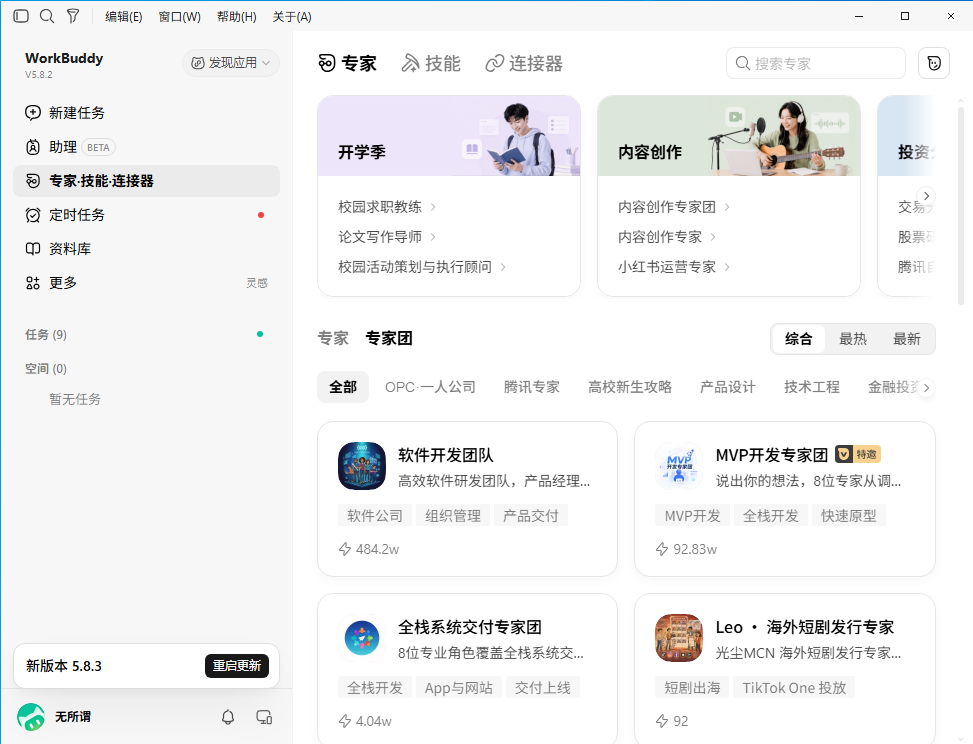
Overview
- Tool name: WorkBuddy
- Developer: Tencent
- Official website: https://www.workbuddy.cn/
- Category: AI Agents
WorkBuddy is Tencent's all-purpose AI workspace. You describe what you need in plain language, and it plans the steps, executes them, and hands back finished artifacts — documents, spreadsheets, slide decks, analysis, images, and working apps — rather than a block of text you still have to act on. It runs on Windows and macOS desktop clients, reads and edits local files once you grant access, and connects into Tencent's office ecosystem. Experts, skills, connectors, and a knowledge library extend what it can do beyond the built-in models.
Key Uses
- Documents, reports, and writing: Draft work reports, emails, and meeting notes; polish existing drafts; and pull key points out of a pile of source material to produce a summary you can actually send.
- Spreadsheets and data analysis: Hand it an Excel file and ask for totals, groupings, or charts. It runs the aggregation, builds the visualization, and can return a written analysis alongside it.
- Presentations from one sentence: Describe the deck you need and get a complete slide file back, or generate slides from an existing document and then adjust the structure, content, and visual style.
- Local file operations in bulk: With permission, it renames, reorganizes, and converts files on your machine and pulls table data out of PDFs — the kind of repetitive file work that eats an afternoon.
- Code, websites, and apps: Read an existing project, write new code, and build websites or applications. Deployment and a managed backend are available when the project needs to run somewhere.
- Design and creative output: Start from an idea and produce images, slides, web pages, or other visual material without moving between separate tools.
- Scheduled and event-driven automation: Set recurring work to run on a timer or on a trigger, so routine collection and organization tasks keep moving without you opening the app.
Pricing
- Trial (free): ¥0, 500 credits per month, auto model routing with a subset of models available, 3 automated tasks, 5 projects, 5 GB library, 10 hosted apps, 3 personal assistants.
- Standard: ¥99/month (¥70/month on continuous monthly billing, ¥672/year on continuous annual billing), 2,000 base credits plus a limited-time bonus of 2,000 — 4,000 total per month, all models selectable, 15 automated tasks, 10 projects, 10 GB library.
- Advanced: ¥199/month (¥140/month, ¥1,344/year), 4,000 base plus 5,000 bonus — 9,000 total per month, 30 automated tasks, 15 projects, 20 GB library.
- Flagship: ¥999/month (¥700/month, ¥6,720/year), 20,000 base plus 30,000 bonus — 50,000 total per month, 99 automated tasks, 20 projects, 50 GB library.
- Enterprise: SaaS Enterprise (Flagship) at ¥198 per seat per month (¥2,376 per seat per year), 2,000 credits per seat per month shared across the team, one seat minimum. Private-cloud Enterprise (Dedicated) at ¥316 per seat per month (¥3,792 per seat per year), 100 seat minimum, adding network controls, dedicated plug-ins, isolated service instances, and tenant data isolation.
Credit allowances, bonus promotions, and tier names change — the four personal tiers took effect on July 1, 2026 and replaced a single professional plan. Bonus credits expire one month after they land. WorkBuddy and CodeBuddy share one credit pool per account. Check workbuddy.cn for current figures before subscribing.
Who It Is For
- Knowledge workers with heavy routine load: Reporting, summarizing, formatting, and file organizing are exactly the jobs that justify handing work over rather than prompting a chatbot for text.
- Analysts and operations staff: Spreadsheet aggregation, chart generation, and recurring data pulls run unattended once configured, which is where the automation features pay off.
- Teams already inside Tencent's ecosystem: The knowledge library integrates ima, Lexiang, and Tencent Docs, so material your team already maintains becomes context instead of something you re-upload.
- Builders who want to ship something working: Websites, apps, and managed backends can be produced and deployed from the same workspace, not just described.
- Organizations with compliance requirements: Enterprise tiers add SSO, usage controls, centralized billing, custom skills and experts, security auditing, and — on the dedicated tier — tenant data isolation.
How to Use WorkBuddy
1. Download the WorkBuddy desktop client for Windows or macOS from workbuddy.cn and install it. There is no web or Linux client.
2. Sign in. The free Trial tier is available immediately with no payment details.
3. Pick a working mode before you type: Agent to have it act directly, Plan to review the approach before execution, or Ask for analysis only with no changes made.
4. Describe the outcome you want in plain language — the goal, not the sequence of steps. Vague briefs still produce vague results.
5. Attach what the task depends on: local files, a knowledge library source, or a named expert or skill that carries the method you want used.
6. Watch the task run. If the direction is wrong, hit stop and re-describe — you don't have to restart from zero.
7. Review the output in the results panel, which shows the artifact, the full file list, what changed, and a preview in one place.
8. Iterate in the same thread so context is preserved, then export the result. For work that repeats, turn it into a scheduled or event-triggered automated task.
Tips for Best Results
- Give the goal, not the recipe. WorkBuddy plans the steps itself; spelling out every operation in advance removes the part that saves you the most time.
- Load the library before you need it. Material you have accumulated in the knowledge library is what separates generic output from work that matches your team's terminology and prior decisions.
- Use experts for anything you'd otherwise rewrite. If you find yourself restructuring AI output every time, an expert carrying domain method will cut that down more than prompt tweaking will.
- Run tasks in parallel. Multiple tasks process at once, so batch independent work instead of waiting on each one serially.
- Automate the recurring ones first. Scheduled tasks are where the real time savings sits — a daily cleanup job you never open again beats a one-off report.
- Stop early when it drifts. Interrupting a wrong run costs far less than letting it finish and sorting out the mess afterward.
- Watch the credit balance on heavy tiers. Complex multi-step tasks draw down credits fast, and bonus credits expire a month after they arrive.
Limitations
- Desktop only. Windows and macOS clients are supported; there is no web version and no Linux build, so you cannot use it from a machine outside those two platforms.
- Credit-metered. Every task draws from a monthly pool, bonus credits expire after one month, and they do not roll over — heavy users will hit the ceiling.
- Local file access needs your authorization. That is a deliberate boundary, but it also means the setup step cannot be skipped.
- The free tier is thin. 500 credits a month and 3 automated tasks is enough to evaluate, not enough to move real work onto.
- Tightest fit inside Tencent's ecosystem. The knowledge library integrations are a real advantage if you use Tencent Docs, ima, or Lexiang, and inert if you don't.
- Output still needs review. Multi-step agent runs get things wrong in ways that look plausible, so anything going outward should be checked.
- Enterprise features are paywalled. SSO, audit logging, custom experts, and tenant isolation are not available on any personal tier.
Frequently Asked Questions
Is WorkBuddy free?
There is a free Trial tier with 500 credits per month, auto model routing, 3 automated tasks, and a 5 GB library. It is enough to evaluate the tool; sustained work needs a paid tier. Standard starts at ¥99/month, less on continuous billing.
How is this different from chatting with an AI?
A chatbot gives you advice and text. WorkBuddy executes: it plans the steps, reads and writes local files with your permission, handles multi-step tasks, and returns a finished artifact — a document, spreadsheet, deck, or app — that you can check and use.
Which platforms does it support?
Windows and macOS desktop clients. Linux and web versions are not supported, and automation tasks are meant to be configured and run in the desktop client.
What are experts and skills?
Experts package domain knowledge and working method so output follows a discipline instead of generic patterns; skills are reusable procedures. Enterprise tiers can define their own. Both are meant to cut down how much you have to rewrite.
What is the knowledge library?
A place to keep the material that tasks draw on. It integrates ima, Lexiang, and Tencent Docs natively, so product docs, research, and prior analyses become retrievable context rather than files you re-attach each time.
How do WorkBuddy and CodeBuddy relate?
Both belong to Tencent's Buddy AI family and share one credit pool per account — you don't need separate subscriptions. CodeBuddy is oriented toward development work; WorkBuddy covers general office and creative tasks.
What happens to my files and data?
Local file operations require explicit authorization. Enterprise tiers add security auditing, usage controls, and, on the private-cloud dedicated tier, dedicated instances with tenant data isolation. Review Tencent's current service agreement and privacy terms for specifics.