Overview
- Name: DeepSeek Harness (CLI: `dsh`)
- Developer: DeepSeek
- Official site: https://www.deepseek.com/en/harness/
- License: MIT
- Status: Public preview worldwide
- Category: AI Agents
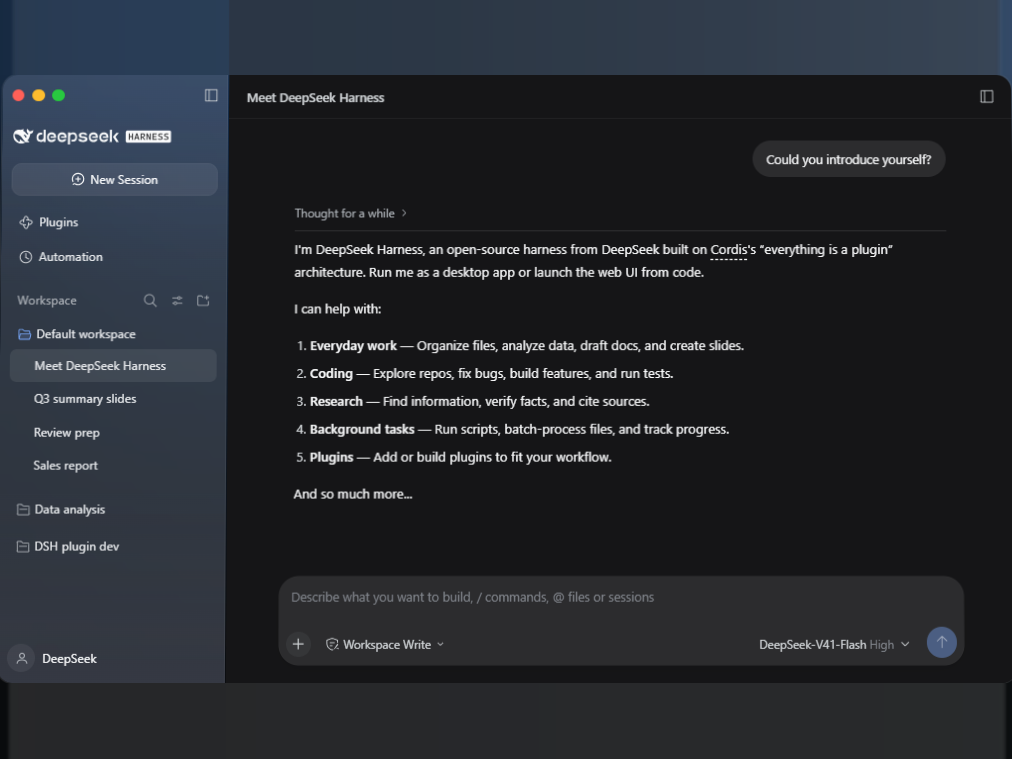
DeepSeek Harness is DeepSeek's open-source agent framework, built on Cordis's "everything is a plugin" architecture. Run it as a desktop app or launch a local web UI from the command line. What you get is not a chat box but a workspace where the model can read and write files, execute scripts and install plugins - so it delivers documents, spreadsheets, slide decks and edited code, not text you still have to act on.
The default setup is `DeepSeek-V41-Flash High` in `Workspace Write` mode, the latter meaning it has real write access to that workspace.
Main uses
- Documents and decks: sort scattered files, pull conclusions out of data, write them up, then generate a deck you can present. One chain, without moving between four different tools.
- Spreadsheets and analysis: drop a sheet into the workspace and have it summarize, group and compare, with charts and a written conclusion.
- Code and repositories: read an unfamiliar project's structure, locate defects, add features, run tests. Not autocomplete - it finds its own way through a codebase.
- Research and fact-checking: find information, verify it, cite the source. Sources are required, not optional.
- Batch local file work: hundreds of files at once - bulk rename, format conversion, table extraction from PDFs - running in the background with visible progress.
- Automating recurring work: with the Scheduled tasks plugin, jobs start on a timetable and repeat. Daily and weekly reports stop being manual.
- Extending its own capabilities: install plugins, or generate them through conversation in Creator mode. Even the interface can be reshaped by plugins.
Pricing
- The software: MIT licensed and free. Self-host it, modify it, redistribute it.
- Model calls: not included. You supply your own DeepSeek API credentials and pay per use at official API rates.
- Subscription or seat fees: none listed on the official page, and no price table.
In short: the tool is free, the tokens are not. Check DeepSeek's official API documentation for current rates - this page does not restate them.
Who it suits
- Anyone with a weekly deliverable: status reports, monthly reviews, quarterly retrospectives. The collect-organize-write-visualize chain shrinks dramatically.
- Developers facing an unfamiliar codebase: have it read through, run the test suite and sweep the obvious problems before you dive in.
- Research that needs citations: for when "the AI said so" is not good enough and you need to click through to the source.
- Teams with recurring fixed work: daily reports, monitoring, batch file processing - set up scheduled tasks and stop thinking about them.
- Users who care where files live: it runs locally, with your own directory as the workspace, not someone else's cloud drive.
- People who want to lock in repeated labour: describe the requirement in Creator mode and get a plugin, without learning a development spec first.
How to use DeepSeek Harness
1. Install Node.js. That is the only hard prerequisite.
2. Run `npx @deepseek-ai/dsh web` in a terminal and the local interface opens in your browser; a desktop app build is also available.
3. Point Workspace at the directory for this task - Default workspace unless you change it.
4. Confirm the mode. `Workspace Write` allows reads and writes; it is the mode that does real work, and it will genuinely touch your files.
5. Confirm the model tier. `DeepSeek-V41-Flash High` is the default; step up for harder tasks.
6. Describe the outcome you want. Three input styles: plain language, `/` slash commands, and `@` to reference specific files or sessions.
7. Watch it work. Output previews in the workspace - if it is wrong, keep talking and it revises.
8. When unsure, open the execution trace: every tool call, argument and return value is recorded.
9. For anything you will do again, enable the Scheduled tasks plugin and turn it into a recurring job.
Practical advice
- State the goal, not the steps. Breaking work into steps is its job. Writing every step yourself removes the part that saves you time.
- Trial it in a scratch directory first. `Workspace Write` is real permission, not a simulation. Confirm the behaviour before pointing it at production material.
- Use `@` to point precisely. Instead of "that spreadsheet", `@` the actual file. One less guess, one less redo.
- Watch the trace on complex tasks. A plausible result does not mean a correct process. Spot-check intermediate steps.
- Turn recurring work into scheduled jobs. A daily cleanup you never open again is worth more than a one-off report.
- Build a plugin instead of forcing a workaround. When existing features do not fit, describe what you need in Creator mode - faster than bending what is there.
- Keep a fallback during preview. Do not make it the only path for critical workflows; releases can change behaviour.
- Split large jobs into stages. One giant end-to-end run is hard to debug; staged runs can be checked one at a time.
Limitations and cautions
- Still a public preview. Features, interface and plugin APIs may change. Not suitable for production flows that cannot be interrupted.
- It is not a model. Capability depends on what you connect. `DeepSeek-V41-Flash High` is the official demo configuration; swapping models changes results.
- Write access is real. It modifies files and runs commands. That is why it can work - and why you need to set boundaries.
- No published pricing or quotas. The official page lists no subscription information, rate limits or usage quotas; those live in the API documentation.
- The ecosystem is early. The plugin system is the headline feature, but plugin count and maturity depend on community progress - do not expect a full catalogue out of the box.
- Output must be reviewed. Agent errors often look correct. Anything going to an external audience should be read by a human first.
- Desktop platforms are not specified. The official page mentions a desktop app and a web UI but does not list supported operating systems.
Frequently asked questions
Is DeepSeek Harness free?
The software is - MIT licensed, self-hostable, modifiable. Model calls are not: you supply DeepSeek API credentials and pay per use at official rates. There is no subscription or seat pricing on the official page.
How is it different from the DeepSeek web app?
The web app answers questions; this one works on your machine. Ask either to "turn this data into a quarterly review" and the web app returns text or an image, while Harness reads your files, computes the numbers, builds the deck and leaves the result in the workspace.
How does it compare with Claude Code or Cursor?
Those are coding products tied to their own models. Harness covers more than code - office documents, data analysis, research and background batches - with a swappable model, plugins you can build yourself and a traceable execution record.
What does "everything is a plugin" mean?
Tools, skills and the interface are all built from plugins. Install other people's or generate your own through conversation in Creator mode. Its ceiling is set by the plugin ecosystem, not a fixed launch feature list.
Do I need to know how to code?
No. Everyday tasks are plain language. Technical background only matters for building plugins or deploying from source.
Are there scheduled tasks?
Yes. Enable the Scheduled tasks plugin and jobs start on a timetable, repeat on a cadence, and expose progress and tool call details.
Which platforms are supported?
A desktop app and a local web UI, the latter started with `npx @deepseek-ai/dsh web`. The official page does not list which operating systems the desktop build supports.
Where do my files and data live?
It runs as a local application with your own directory as the workspace. Model calls require a network connection; data handling terms are governed by DeepSeek's official documentation.
*This page is not affiliated with DeepSeek. Features and specifications are based on the official site at deepseek.com/en/harness and the open-source repository (October 2026). The product is in public preview - check the official documentation for the latest.*