Overview
- Tool name: Seko
- Developer: SenseTime
- Official website: https://seko.sensetime.com/
- Category: AI Video Tools
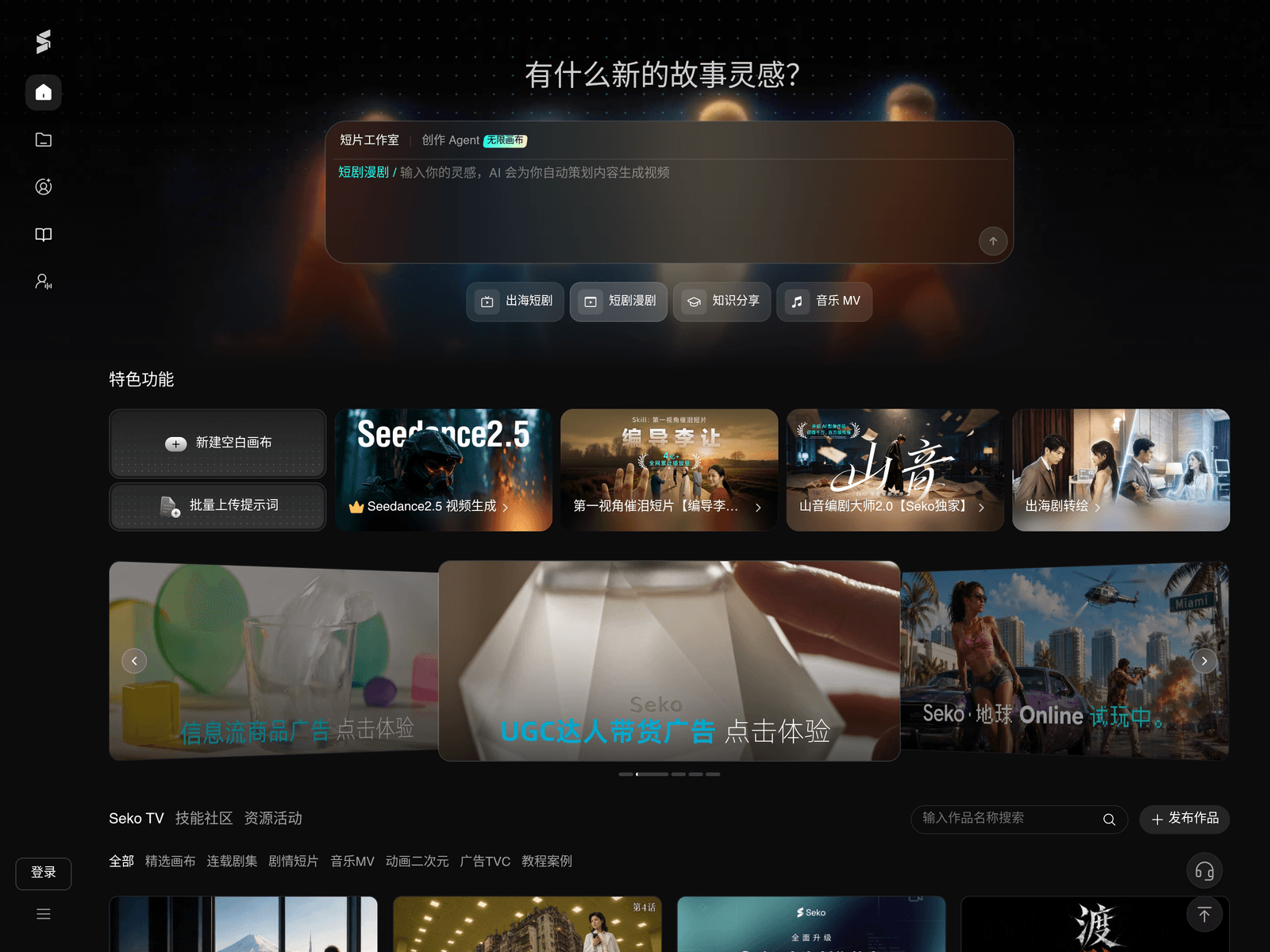
Seko is a one-stop AI video creation platform from SenseTime, the Chinese AI company best known for its SenseNova model family. It launched in July 2025 and reached version 3.0 in July 2026, when SenseTime described it as the industry's first "AI video dream factory." Where most AI video tools generate a single clip, Seko is built as a creation agent that runs the whole chain: idea, script, storyboards, character design, video generation, voice, music and export, inside one workspace.

The pitch is "one-person film crew." You describe an idea in plain language or upload an existing script, and the planning agent produces a treatment, character profiles, scene assets and shot list. Characters are then locked as reusable subjects so the same face, costume and props carry across shots and across episodes, which is the problem that breaks most AI serials. Video generation is not tied to one model: Seko runs SenseTime's own Seko 1.5 video model side by side with ByteDance's Seedance 2.0 (including the Fast tier), Alibaba's Wan and Happy Horse, Kuaishou's Kling, Shengshu's Vidu, PixVerse and MiniMax's Hailuo, choosing per shot or letting you pick.
Two named technologies carry the consistency claims. SekoIDX keeps a character stable across shots and episodes by injecting a negative reference during the high-noise stage of diffusion. SekoTalk syncs mouth movement for two or more speakers in the same shot, up to 60 seconds per shot, with around 60 voices. Output goes to 1080p and 4K, and paid plans remove the watermark on download.
Scale figures come from SenseTime itself: on 3 August 2026 the company announced Seko had passed one million creators in its first year, a 26-fold increase, serving 1,500 enterprise customers, with paying users creating for more than an hour a day on average. An earlier official release put the figure at over 200,000 creators within six months of launch. Treat these as company-reported numbers, not independent audits.
Seko runs entirely in the browser on SenseTime's cloud, so local hardware does not matter. What does matter is cost: every generation consumes credits, and regenerating a shot you did not like costs the same as generating it the first time.
Key Uses
- Short drama and comic drama series: The core use case. Upload or generate a script, let the agent split it into episodes and shots, and produce episode after episode with the same cast. Paid tiers allow multi-episode projects of 10 to 80 episodes depending on plan; single projects support up to 100 episodes of continuous creation.
- Idea to script and shot list: Describe a premise in one sentence and the planning agent returns a treatment, character settings, art direction and a shot list. No screenwriting knowledge required, and you can edit any of it by asking in plain language.
- Character and asset consistency: SekoIDX holds a character's face, build and costume stable across shots, scenes and episodes, while the agent still varies makeup and wardrobe by scene. This is what makes serialized AI content feasible instead of a new face every cut.
- Lip sync, voice and music: SekoTalk syncs lip movement for two or more people at once, up to 60 seconds per shot, with roughly 60 voice options. Music, sound effects and background tracks are generated in the same workspace, so audio does not leave the platform.
- Music videos: Upload a track and generate a lip-synced performance video with shots matched to mood and rhythm. This is one of the fastest things to produce well on Seko because a song already dictates pacing.
- Explainer, marketing and ad video: Knowledge-sharing and ad templates cover product explainers, government and tourism promotion, and UGC-style product-selling ads. Brand logos and product images can be placed through canvas editing.
- Overseas and multilingual output: Seko 3.0 added an overseas short-drama pipeline, including script-to-multilingual finished video and style transfer for overseas dramas. Check language coverage against your target market before committing a season to it.
- Canvas-level retouching: Work at shot level on an infinite canvas: erase objects, repaint regions, add or remove elements, and set first-frame to last-frame transitions. Reference images and prompts stay linked to each node.
- Reusable Skills from top creators: The Skills library packages proven workflows and styles from leading creators and studios, across six categories and more than twenty skills as of August 2026. Calling a Skill is faster than rebuilding a look from scratch.
Pricing
- Free: ¥0. Includes a registration credit grant and daily login credits, basic tools and video workflows. Third-party reviews put the free tier at roughly 1 episode and 30 shots per one-click generation, so it is enough to learn the flow, not to ship a series.
- Standard: ¥60 per month on continuous monthly billing, with a first-purchase promotional price around ¥39. Annual billing is ¥576 per year against a list price of ¥720, which works out to ¥48 per month.
- Premium: ¥300 per month, with a first-purchase promotion around ¥195. Annual billing is ¥2,880 per year against a list price of ¥3,600, or ¥240 per month.
- Prime: ¥875 per month. Annual billing is ¥8,400 per year against a list price of ¥10,500, or ¥700 per month.
- Enterprise: custom quote. Adds larger custom credit packs, three-tier discounts on model credit consumption, guaranteed Seedance concurrency and dedicated support.
- Credits by plan, per year: Standard 6,000, Premium 36,000, Prime 120,000. Credits are valid for one year and are what you actually spend when generating.
- Generation allowances per year: Seedance 2.0 up to 500 / 3,000 / 10,000 seconds; Happy Horse 1.1 up to 1,200 / 7,200 / 24,000 seconds; image model NB Pro up to 600 / 3,600 / 12,000 images; image model G2 up to 3,000 / 18,000 / 60,000 images.
- Other entitlements scale the same way: one-click shot generation up to 50 / 80 / 100 shots, multi-episode limits of 10 / 50 / 80 episodes, 1080p and 4K output, faster generation channels, and watermark-free downloads on all paid tiers.
- Standalone credit packs, if you would rather top up than subscribe: 500 credits ¥60, 1,000 ¥120, 1,500 ¥180, 3,000 ¥360, 5,000 ¥600, 8,000 ¥960. That is roughly ¥0.12 per credit. Third-party reviews cite consumption as low as 8 credits per second on the Seedance 2.0 economy tier, but Seko does not publish a public per-second rate card, so verify inside the console.
Prices above were read from Seko's own pricing page on 29 October 2026 and are billed in RMB. Monthly figures are the continuous-monthly list prices; the lower ¥39 and ¥195 figures are first-purchase promotions reported by third-party reviews rather than a standing price, so treat the higher number as the real cost of staying subscribed. Annual prices are discounted against the listed yearly price and renew at the discounted rate. Credits expire after a year and every regeneration costs credits again, so budget for retries, not just final shots. This page is not affiliated with SenseTime; confirm the current figures on seko.sensetime.com/pricing before you pay.
Who It Is For
- Short drama and comic drama creators: People publishing serialized episodes who need the same characters to hold up across dozens of episodes. SenseTime says about 30% of its creators work on short drama and 20% on comic drama.
- Solo creators and short video bloggers: One person covering writing, art direction and editing. The value here is not quality per shot but removing the tool-switching overhead.
- MCN agencies and content studios: Teams running many series in parallel, where reusable subjects, shared assets and batch generation matter more than any single shot.
- Advertising and marketing teams: Brands that need story-led or UGC-style clips quickly, with logos and product shots composited on the canvas.
- IP holders and web novel authors: Rights holders who want to test whether a novel or script works on screen before committing to live production.
- Enterprises, tourism boards and public sector: Organizations producing explainers, training and promotional video at volume. Enterprise plans add team management and concurrency guarantees.
How to Use Seko
1. Open seko.sensetime.com and register with a phone number. New accounts receive a credit grant, and logging in daily adds more, so claim those before spending anything.
2. Start from the home input box or create a blank canvas. Type your idea in ordinary language, or upload an existing script if you already have one.
3. Let the planning agent produce the treatment, character settings, art direction and episode breakdown. Read it and correct it here, because everything downstream inherits it.
4. Create your subjects: characters, costumes, props and locations. Upload or generate reference images and lock them, so later shots reuse the same assets instead of re-inventing them.
5. Generate the storyboard. Confirm or regenerate individual shots, and use sample mode for cheap tests if you are unsure about a look: it renders a draft you can promote to a final shot while the draft is still valid.
6. Pick a model for video generation. Leave it on automatic to let Seko choose, or select Seedance, Kling, Vidu, Wan, PixVerse or Hailuo yourself when a specific look matters.
7. Add voice, lip sync and music. Choose a timbre, enable SekoTalk for mouth sync, then layer sound effects and a background track.
8. Retouch on the canvas where needed with erase, region repaint, element add/remove and first-to-last frame transitions, then export the finished video and continue with the next episode.
Tips for Best Results
- Lock characters before you generate in bulk. Create subjects with clear reference images first, then run one test episode and check consistency across cuts before committing ten episodes.
- Spend credits on planning, not on retries. Getting the script, character descriptions and art direction right costs far less than regenerating video you are unhappy with.
- Use sample mode and cheap models for look development. Sample mode exists specifically to cut the cost of finding a style: render a draft, and only pay for a full-quality pass once the look is settled.
- Remember that regeneration bills again. A shot you redo three times costs three times as much, so write prompts carefully and fix problems at storyboard stage.
- Call a Skill instead of starting from a blank prompt. The Skills library encodes pacing, framing and styling that already worked for someone else.
- Estimate before a season, not after. Multiply your episode count by shots per episode, by seconds per shot, against your plan's allowance, and check it against the yearly credit total.
- Write for the strengths of current models: short shots, clear single actions, simple backgrounds. Long takes with complex physical interaction are where AI video still fails most often.
- Export per-shot video and separate audio if you plan to finish in an external editor. It keeps your options open and avoids re-generating a whole sequence for one cut change.
- Check commercial rights before client work. Paid plans generally cover commercial use, but the licensing scope is set by Seko's membership agreement and enterprise contracts, so read it for anything you bill a client for.
Limitations
- Credits are the real constraint. The subscription buys an allowance, and heavy iteration burns it quickly; users who iterate a lot usually end up buying credit packs on top.
- The free tier is a demo, not a workspace. Roughly one episode and 30 one-click shots means you can validate the workflow but not publish a series on it.
- Regeneration is not free. Every retry costs the same as the first generation, which is the single most common budget surprise.
- Consistency is improved, not solved. SekoIDX reduces character drift substantially, but AI video still produces wrong hands, physics errors and broken continuity on long or complex shots.
- Output length per shot is limited. Even with SekoTalk at up to 60 seconds, most reliable results are short clips assembled into a sequence.
- Billing and promotions change. First-purchase discounts such as ¥39 and ¥195 are promotional, and the published yearly prices carry countdown-style offers, so the price you see may not be the renewal price.
- Commercial licensing needs checking. Rights depend on the membership agreement and, for enterprise work, on a negotiated contract rather than on the plan page.
- It is a closed platform. Projects, assets and credits live inside Seko, and there is no self-hosted or offline option, so plan your own backups of finished videos.
- Queue times and model availability vary. Third-party models can be withdrawn or repriced, and peak-time generation queues are outside your control.
Frequently Asked Questions
Is Seko free?
Partly. There is a free tier with registration credits and daily login credits, and it is enough to test the full workflow. Producing a series requires a paid plan, because credits, episode counts and one-click shot counts are capped on the free tier.
How much does Seko cost?
As of October 2026 on seko.sensetime.com/pricing: Standard ¥60/month or ¥576/year, Premium ¥300/month or ¥2,880/year, Prime ¥875/month or ¥8,400/year, and Enterprise by custom quote. First-purchase promotions around ¥39 and ¥195 have been reported by reviewers, but the standing monthly prices are the higher ones.
How is it different from an ordinary AI video generator?
Ordinary generators make one clip from one prompt. Seko runs the whole chain in one place: script, characters, storyboards, generation, lip sync, music and export, and it keeps characters consistent across episodes rather than per shot.
Will my character change face between episodes?
Much less than with a plain generator. SekoIDX injects a negative reference during generation to hold identity, and the agent reuses the subjects you locked, so the same character carries across shots and episodes while still allowing scene-appropriate wardrobe changes.
Which models does it use?
Seko runs its own models and third-party ones side by side. In-house: Seko 1.5 for video, SekoIDX for image generation and character consistency, SekoTalk for lip sync. Integrated: ByteDance's Seedance 2.0 (including Fast), Alibaba's Wan and Happy Horse, Kuaishou's Kling, Shengshu's Vidu, PixVerse and MiniMax's Hailuo. You can schedule automatically or pick a model per shot.
How long can a single shot be, and can more than one person speak?
SekoTalk syncs lip movement for two or more people in one shot, up to 60 seconds per shot, with about 60 voices. Finished videos are assembled from many such shots.
Can I use the output commercially?
Paid plans generally include commercial use rights and remove the watermark on download, but the exact scope is defined by Seko's membership agreement. For client work or anything regulated, confirm the terms or go through an enterprise contract.
What hardware do I need?
None beyond a browser and an internet connection. Seko runs entirely on SenseTime's cloud, so generation does not use your local machine.
What is the latest version?
Seko 3.0, announced in July 2026, which SenseTime positions as a creator growth platform with an agent-driven infinite canvas, a Skills library of more than twenty skills across six categories, and an overseas short-drama pipeline covering multilingual finished video.