
Overview
- Tool name: RHTV
- Developer: RunningHub
- Official website: https://rhtv.runninghub.cn/
- Category: AI Video Tools
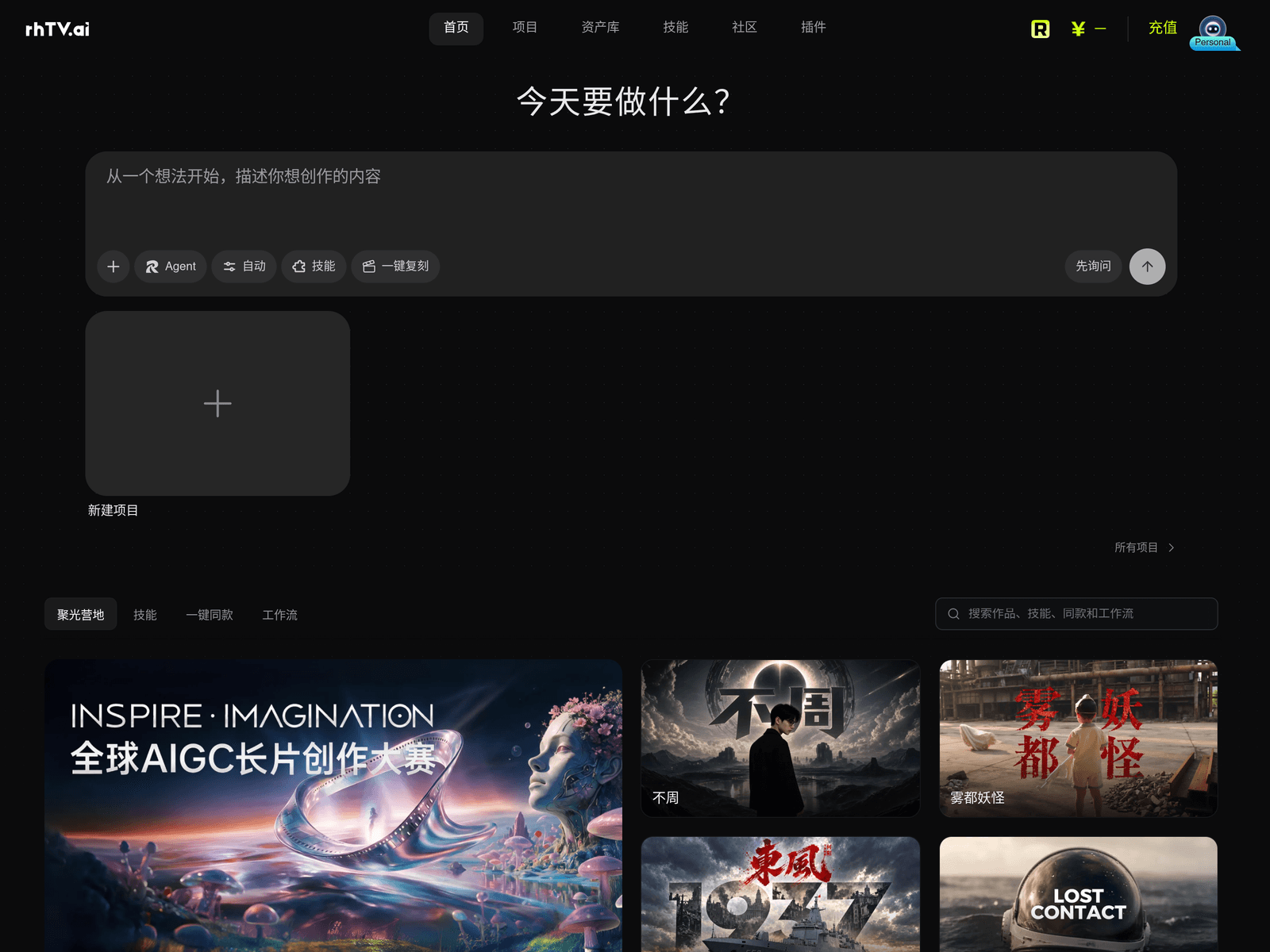
RHTV is an AI video creation canvas from RunningHub that organizes projects, assets, skills, and community inspiration in one workflow. It helps creators move from an initial idea toward structured video production using a canvas-based workspace.
Key Uses
- Video project setup: RHTV provides project areas where creators can start a new video project and keep related ideas, assets, and workflow elements in the same workspace.
- Inspiration discovery: The inspiration section gathers short videos, workflows, and skills, helping creators review styles, subjects, and formats before production begins.
- Skill and workflow access: The interface includes skills and workflow entries, allowing users to apply existing creative methods to video production instead of building every step manually.
- Community browsing: Community projects show a range of video works, which can help creators study themes, duration patterns, and presentation approaches for their own planning.
- Asset organization: The asset library entry supports storing and accessing creative materials, helping keep project files connected to the canvas workflow.
- Idea framing: The site describes starting from an idea and describing what to create, which suits early-stage work where a rough concept needs to become a workable video direction.
Who It Is For
- Short-form video creators: Creators planning short videos can use RHTV to collect references, organize project files, and shape a production direction from a single idea.
- Workflow-oriented creators: Users who prefer structured production pipelines can use the skills and workflow areas to arrange repeated video-making steps in one place.
- AI video experimenters: People exploring AI video tools, canvas-based creation, or workflow combinations can test how inspiration, assets, and skills fit into a single environment.
- Small creative teams: Teams that need to track ongoing video projects may benefit from recent projects, all projects, and asset management entries for continued work.
- Creators seeking references: Users who need topic or style references can browse community works and inspiration feeds to inform planning without leaving the workspace.
Tips for Best Results
- Define the video goal first: Before creating a project, decide the intended duration, theme, and publishing context so later choices around skills and assets stay focused.
- Use inspiration deliberately: When browsing featured works, note subject, pacing, duration, and visual style instead of treating the feed as passive viewing.
- Separate assets by project: Organize materials by individual video project to avoid a mixed asset library and make future reuse easier.
- Start from existing skills: If available skills or workflows match the task, adapt them first, then add personal steps as the project becomes clearer.
- Name projects clearly: As recent and all projects accumulate, use names that reflect topic, version, or date to keep long-term project management simple.
Limitations
- Public details are limited: The available page mainly shows entries for projects, assets, skills, community, and plugins, so exact feature boundaries should be confirmed inside the product.
- Results depend on inputs: As a canvas-based AI video creation tool, output quality is affected by the idea description, prepared assets, selected skills, and workflow setup.
- Community works are references only: Inspiration and community projects can guide planning, but creators should avoid copying expressions directly and should adapt ideas to their own goals.
- Billing details are not fully shown: A recharge entry appears on the page, but pricing, free quota, and usage limits are not clearly stated in the available information.
Frequently Asked Questions
How do I start using RHTV?
Open the RHTV website and begin from the project area, where you can create a new project and describe the idea you want to develop. The page also provides inspiration, skills, assets, and community sections that can be used before or during project setup. The exact workflow may vary depending on the selected project type and skills.
Is RHTV free or does it offer a free quota?
The page includes a recharge entry, which suggests paid usage may exist, but the available information does not clearly state free quotas, pricing plans, or usage limits. Check the account or official policy pages inside the service for current access details before relying on it for production.
What platforms or languages does RHTV support?
The available information does not clearly list supported platforms, operating systems, or interface languages. The page is mainly in Chinese and shows entries for projects, assets, skills, community, and plugins. For multilingual or cross-platform support, refer to the official product pages.
How is RHTV different from typical AI video generators?
RHTV places video creation in a canvas and workflow setting rather than focusing only on one-step video generation. It connects projects, assets, skills, community works, and inspiration discovery, which suits creators who need to organize ideas, materials, and production steps together.
Are there alternatives to RHTV?
If the goal is only to generate a video clip, a standalone AI video generator may be enough. If the priority is project organization, asset management, and workflow assembly, a canvas-style tool like RHTV may be closer to the need. The choice should depend on project scale, asset volume, and workflow complexity.